What if you could transform a corner of your home into a high-tech hub for experimentation, learning, and innovation? Imagine a compact setup where you can manage your own network, experiment with virtualization, or build a custom storage solution, all tailored to your unique needs. The concept of a home lab rack isn’t just for IT professionals or tech enthusiasts; it’s a growing trend for anyone seeking hands-on experience with modern technology. By combining the versatility of 3D printing with the efficiency of a home lab rack, you can create a personalized system that maximizes functionality while minimizing space. But how do you balance creativity with practicality in such a compact setup? Below, we will guide you through the essentials of building a compact home lab, from selecting the right components to tackling challenges like cable management and hardware fit. You’ll discover how 3D printing can unlock new possibilities for customization, allowing you to design mounts, enclosures, and adapters that fit your exact needs. Whether you’re looking to expand your technical skills or simply enjoy the satisfaction of building something from scratch, this approach offers a unique blend of DIY innovation and practical problem-solving. By the end, you’ll have the tools and insights to create a home lab that’s not only efficient but also a reflection of your creativity and expertise.
Why Choose a 10-Inch Home Lab Rack?
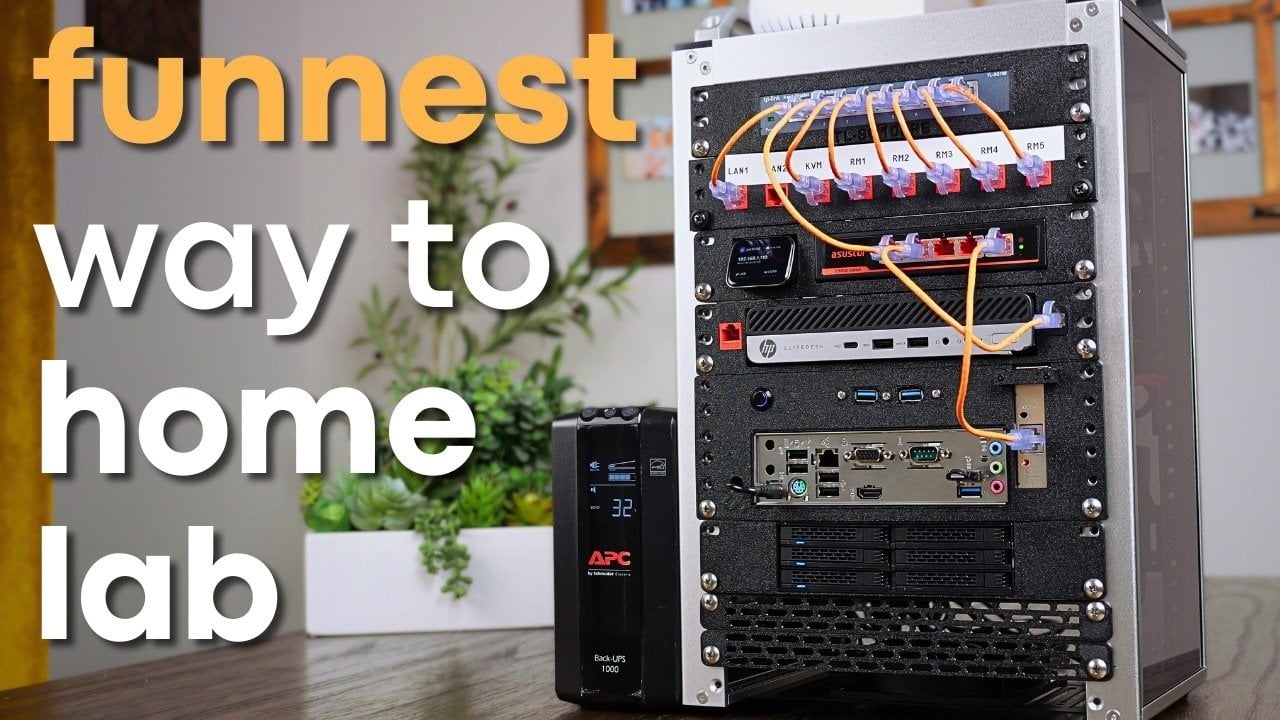
The home lab rack serves as the backbone of any home lab setup, offering a smaller, more space-efficient alternative to the standard 19-inch rack. Its compact size makes it particularly suitable for home environments where space is limited. Despite its smaller dimensions, the 10-inch rack provides sufficient flexibility to house essential components for networking, computing, and storage. Typically, an 8U 10-inch rack includes features such as:
- Acrylic panels: These offer a lightweight yet sturdy structure, ensuring durability without adding unnecessary bulk.
- Carry handles: These enhance portability, making it easier to move the rack when needed.
- Optional accessories: Blank panels, trays for single-board computers, and mounts for ITX motherboards allow for further customization.
However, the reduced size does present challenges. Cable management and component placement require careful planning to avoid clutter. The modular design of the rack, however, allows for adaptability, making it a practical and efficient choice for a home lab.
Customizing Your Lab with 3D Printing
3D printing plays a pivotal role in enhancing the functionality of your home lab rack. With a 3D printer, you can design and fabricate custom components that are tailored to your hardware. This level of customization ensures that your setup is not only functional but also optimized for your specific needs. Examples of useful 3D-printed parts include:
- Mounts: Create mounts for network switches, patch panels, or other networking equipment, ensuring a secure fit within the rack.
- Enclosures: Custom enclosures for Raspberry Pi boards, mini ITX motherboards, or small form factor PCs help protect your hardware while maintaining accessibility.
- Adapters and brackets: Useful for accommodating non-standard hardware or unique configurations.
For best results, PETG filament is recommended due to its durability and heat resistance, ensuring your printed components can withstand home lab demands. By using 3D printing, you can overcome the limitations of off-the-shelf components and create a setup that is truly your own.
Essential Components for Your Home Lab
A well-designed home lab rack integrates key technologies to support networking, computing, and storage. Each component plays a critical role in ensuring the overall functionality and efficiency of the system. Below is a breakdown of the essential components you might include:
- Networking: Equip your lab with 1Gbps and 2.5Gbps switches, patch panels, and a reliable router for a robust network infrastructure.
- Computing: A mini ITX motherboard serves as the foundation for a Network Attached Storage (NAS) system, while a small form factor PC running Proxmox can handle virtualization tasks efficiently.
- Storage: A 6-bay 2.5-inch drive cage provides a compact yet scalable solution for managing large volumes of data effectively.
- KVM: A compact Keyboard, Video, Mouse (KVM) device simplifies remote management and BIOS access, streamlining system administration tasks.
By carefully selecting and integrating these elements, you can build a home lab that meets your specific needs while remaining compact and organized. For more strategies, check out our analysis of building an eco-friendly lab on a budget.
Overcoming Challenges in a Compact Setup
Building a compact home lab presents distinct challenges, especially when operating within the constraints of a 10-inch rack. The limited space necessitates meticulous planning and attention to detail. Here are some common challenges and strategies for addressing them:
- Cable Management: Avoid clutter and ensure accessibility by using zip ties, cable clips, or custom 3D-printed guides for efficient cable organization.
- Power Distribution: Managing power sources can be tricky in a compact setup; consider an Uninterruptible Power Supply (UPS) for reliable power.
- Hardware Fit: Adjust your designs to accommodate unique hardware dimensions, ensuring a secure and functional fit.
While these challenges may seem daunting, they provide an opportunity to develop problem-solving skills and refine your design approach. By addressing these issues proactively, you can create a home lab that is both efficient and easy to maintain, much like strategies discussed in our guide on DeepSeek AI model V3.1.
Balancing Costs and Benefits
Building a compact home lab rack and utilizing 3D printing involves certain costs, but the benefits often outweigh the financial investment. Below is a rough breakdown of expenses:
- 10-Inch Rack: A basic rack typically costs around $180, though prices may vary based on features.
- 3D Printing Materials: A spool of PETG filament typically costs around $25, sufficient for most small projects.
While this setup may not be the cheapest option, the value lies in the learning experience and the ability to create a system tailored to your needs. For many, the satisfaction of building a personalized home lab and developing technical skills makes the investment worthwhile.
Final Thoughts on Crafting Your Own Home Lab
Combining 3D printing with a 10-inch lab rack setup offers a unique opportunity to build a compact, functional, and highly personalized home lab. This project emphasizes the importance of planning, adaptability, and creativity, making it an excellent choice for both seasoned tech enthusiasts and newcomers. By using 3D printing and thoughtful design, you can overcome space constraints and create a system that meets your networking, computing, and storage needs. If you want to know more about AI integration, read our article on how Kellanova drives marketing KPIs.
To deepen this topic, check our detailed analyses on Gadgets & Devices section