Managing a growing collection of photos and videos can feel overwhelming, but with the iOS 26 Photos App, organizing your media has never been easier. Recent statistics indicate that the average person takes over 1,000 photos a year, making the need for a streamlined organization tool critical. The iOS 26 Photos App introduces robust tools designed to simplify photo organization while providing enhanced sorting and filtering capabilities. With this app, you can efficiently locate specific content, customize your library layout, and optimize your overall experience. These features promise to transform how you manage your digital memories, making it both intuitive and effective.
Streamlining Media Management with Advanced Sorting
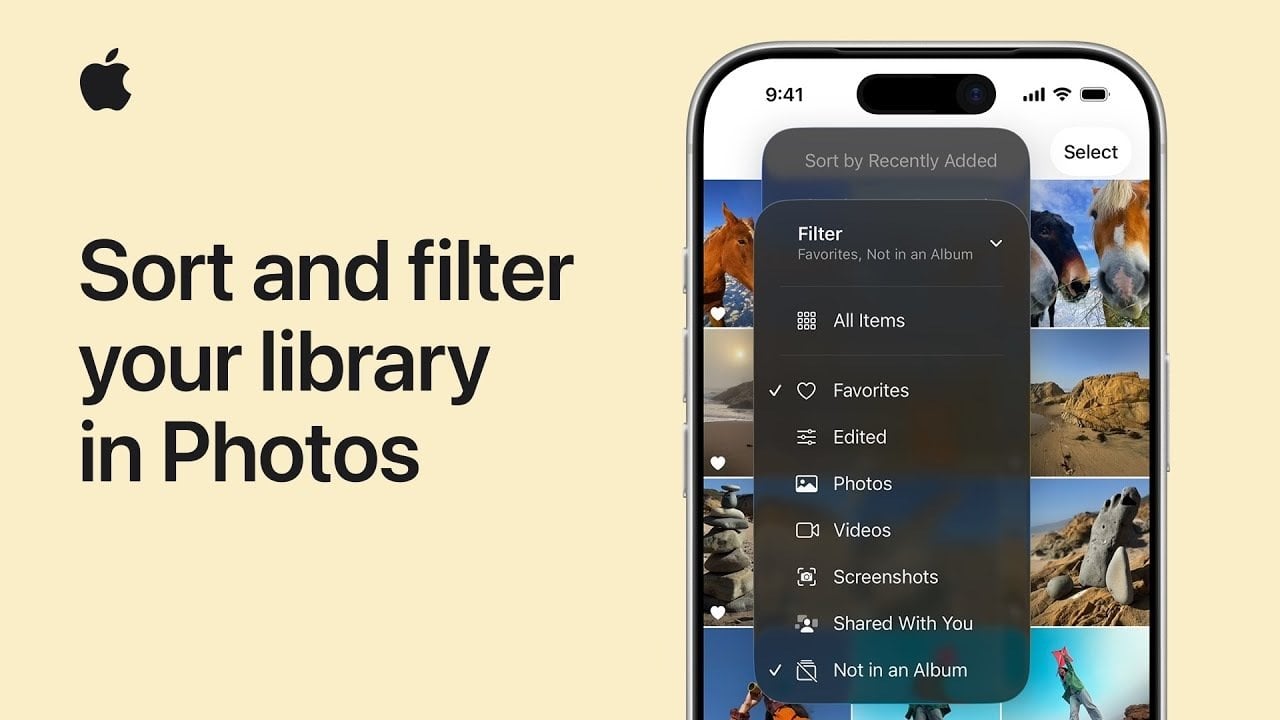
At the core of the iOS 26 Photos App are the enhanced sorting and filtering features. The “Sort and Filter” button is a versatile tool designed to make your media management seamless. It allows you to refine your library with just a few taps, eliminating the need for endless scrolling. Whether you’re searching for your favorite shots, recent additions, or media that hasn’t been categorized into albums yet, this feature helps you quickly narrow down your options. By having this functionality integrated into one accessible interface, the iOS 26 Photos App ensures that managing your media is straightforward and stress-free.
Precise Searches with Powerful Filters
Filters are a game-changer when it comes to focusing on specific types of content within your library. You can easily display only your favorite photos, highlight videos, or exclude items not yet added to albums. This is especially beneficial for users with extensive libraries, as it creates a streamlined view that saves time and effort. With filters applied, you can find the exact photo or video you need without unnecessary distractions. This precision not only enhances your browsing experience but also ensures that your library remains organized and easy to navigate.
Once you’ve located what you are looking for, removing filters and restoring access to your full library is a breeze. The “Sort and Filter” button allows you to effortlessly transition back to your complete collection, ensuring that you can switch between specific searches and broader browsing without interruptions. This flexibility is perfect for users who frequently toggle between organizing specific subsets of their library and exploring their entire collection.
Customizing Your Media’s Order for Better Organization
The iOS 26 Photos App offers a variety of sorting options that let you organize your media according to your preferences. You can choose to sort by “Recently Added” to view your newest content first or arrange items chronologically by “Date Captured.” These options provide a personalized experience, enabling you to maintain order while ensuring quick access to the content you need. By utilizing these sorting tools, you can create a management system that aligns with how you naturally browse.
Accessibility and User Experience Enhancements
The design philosophy behind the iOS 26 Photos App prioritizes ease of use and accessibility. Its user-friendly interface combines sorting and filtering tools within a single, centralized button, making them readily available at all times. Additionally, the app leverages metadata—such as capture dates, file types, and favorite tags—to enhance the accuracy and efficiency of its functionalities. This thoughtful integration ensures that even users with extensive libraries can manage their media with minimal effort.
For those seeking to maximize their results with the iOS 26 Photos App, mastering its features is essential. By effectively using the “Sort and Filter” button, applying targeted filters, and customizing sorting options, you can fundamentally change the way you interact with your pictures and videos. These features are specifically designed to save you time, reduce frustration, and enhance accessibility within your library.
Unlock the Full Potential of Your Media
In conclusion, the iOS 26 Photos App provides advanced tools necessary for anyone looking to manage their photo and video library like a pro. Whether you’re curating a small collection or sifting through thousands of files, its intuitive design and powerful capabilities ensure that your media is always at your fingertips. By reading more about settings you must change on your iPhone to optimize your experience, check out our piece on essential iOS 26 settings. You can also explore how to tackle the pesky battery drain issues with our guide on battery drain solutions.
To deepen this topic, check our detailed analyses on Gadgets & Devices section