In an era where technology evolves at lightning speed, understanding the components that power our devices is crucial. For Mac users, the transition to Apple’s own silicon chips has redefined the landscape, particularly with the introduction of unified memory Mac architectures. This change promises significant performance improvements and greater efficiency. However, it also raises an essential question: how much unified memory do you really need in a Mac? Let’s delve into the details.
Understanding Unified Memory Architecture
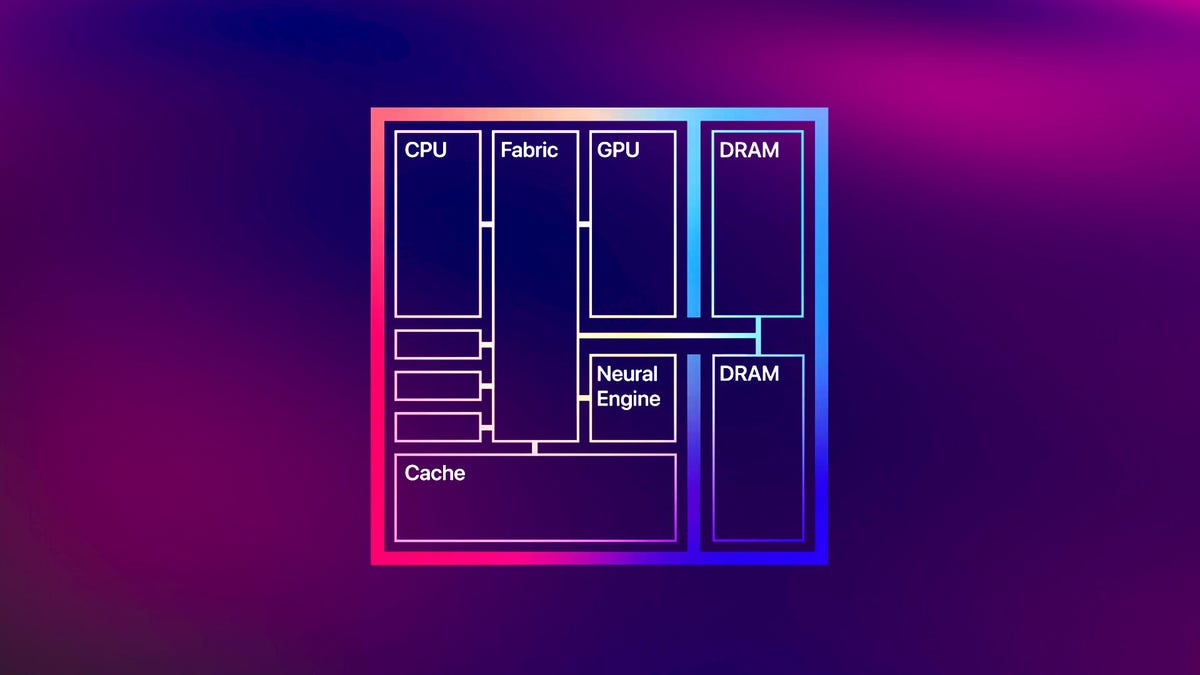
The unified memory Mac architecture is a game-changer. Apple’s System-on-a-Chip (SoC) design integrates CPU, GPU, and Neural Processing Unit (NPU) into a single chip. This integration creates a shared pool of memory that enhances speed and efficiency. Unlike traditional models where memory is split between systems, Apple’s Unified Memory Architecture (UMA) allows for seamless data transfer between processors, effectively eliminating delays.
This transformation was first seen with Apple’s M1 chip, which launched in the 2020 MacBook Air, MacBook Pro, and Mac Mini. The UMA facilitates faster data processing and reduces energy consumption, providing a smoother user experience.
How Much Unified Memory Do You Need?
When purchasing a Mac, deciding how much memory you need is more critical than ever due to the UMA. Most current M4 and M5-based models come with at least 16GB of memory, which suits the everyday tasks like web browsing, document processing, and casual photo editing. If you’re eyeing a used M3 or earlier model, remember that base configurations might limit you to just 8GB. Upgrading to a Pro or Max version from earlier models increases your options.
- For Standard Use: 16GB is often sufficient for general tasks.
- For Enhanced Performance: Consider 24GB or 32GB if your usage is likely to change in the future.
For those heavily involved in creative work, such as video editing, 3D design, or software development, higher memory options are advisable. Aim for at least 48GB or 64GB for demanding applications that require significant resources over time.
The Advantages of Unified Memory
The benefits of a unified memory Mac have been clear since its introduction. By sharing memory between the CPU, GPU, and NPU, the architecture allows for better efficiency and optimized performance. Unlike traditional systems that separate RAM and VRAM, the UMA reduces latency, enabling operations to execute faster. This cohesive setup benefits various applications, especially those utilizing AI, making processing less resource-intensive.
Moreover, Apple’s emphasis on memory compression allows systems with lower physical memory to perform comparably to those with more traditional configurations. For instance, an 8GB UMA Mac could deliver substantial performance that rivals a conventional system with 16GB.
Challenges with Unified Memory
However, not everything about UMA is perfect. Power users—such as engineers or researchers—who juggled multiple demanding applications may hit performance walls if they rely solely on the available shared memory. With only a limited pool of memory to allocate, heavy simultaneous tasks can cause lag as the system resorts to using virtual memory.
- Potential Slowdowns: Your system may start to slow down with time if you max out memory usage.
- Compatibility Considerations: Not all applications are fully optimized for Apple’s silicon, which could affect performance.
Despite these limitations, Apple continues to enhance its software ecosystem to support more memory-intensive applications. Programs like Adobe are already compatible, ensuring a smoother experience for creators.
Future-Proofing Your Mac Experience
When considering the lifespan of your Mac, upgrading the unified memory at purchase is the best strategy for longevity. As software evolves, the demand for memory increases; thus, investing in higher capacity options can avert performance issues down the road.
Ultimately, each user’s individual needs will dictate the appropriate level of memory, especially for those involved in resource-heavy industries.
To deepen this topic, check our detailed analyses on Tech Tips & Tricks section
When you decide on your Mac memory, you’ll ensure optimal performance suited to your needs for years to come.