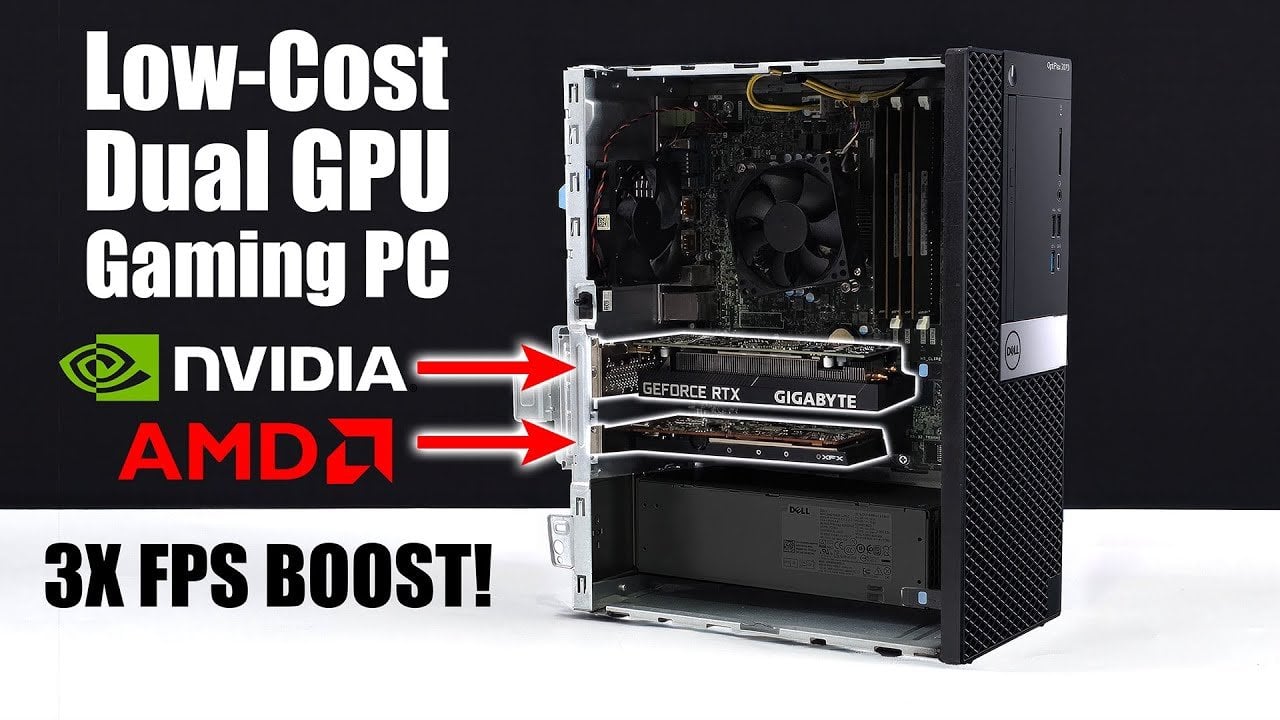
What if you could transform a modest office PC into a gaming powerhouse without breaking the bank? It might sound too good to be true, but a clever dual GPU setup has made it possible to achieve jaw-dropping performance gains on a budget. By pairing an Nvidia RTX 3050 with an AMD Radeon RX6400, supported by innovative software optimizations, one budget system delivered nearly triple the frame rates in some of today’s most demanding games. Imagine running Cyberpunk 2077 at 1440p with smooth, fluid gameplay, on hardware that costs a fraction of a high-end gaming rig. This unconventional approach challenges the notion that innovative gaming requires deep pockets, proving that creativity and resourcefulness can unlock extraordinary results.
In this guide, ETA Prime takes you through how this dual GPU configuration works, the hardware and software tweaks that make it tick, and the real-world gaming benchmarks that showcase its potential. You’ll discover how a simple office PC with limited power and space was transformed into a capable gaming system, handling titles like Spider-Man 2 and Borderlands 4 with ease. But it’s not all smooth sailing; this setup comes with its own challenges and quirks, from power constraints to software compatibility. If you’ve ever wondered how far you can push budget hardware, this innovative solution might just change the way you think about gaming performance.
Dual GPU Budget Gaming PC Build
TL;DR Key Takeaways:
- A budget-friendly Dell Optiplex 770 office PC was transformed into a high-performance gaming system using a dual GPU setup with an Nvidia RTX 3050 and AMD Radeon RX6400.
- Advanced software optimizations, including lossless scaling and strategic GPU task division, enabled nearly triple the frame rates in certain games, particularly at 1080p and 1440p resolutions.
- Significant performance gains were observed in demanding games like Cyberpunk 2077 and Spider-Man 2, with frame rates doubling or more in some scenarios.
- Challenges included limited power supply (260W) and compact hardware constraints, requiring careful planning and precise component selection.
- This innovative approach demonstrates how budget-conscious gamers can achieve high-quality gaming experiences by combining creative hardware configurations with advanced software solutions.
Hardware Configuration: Building a Performance-Driven System
The foundation of this setup was a Dell Optiplex 770, a budget-friendly office PC equipped with an Intel i7-9700 CPU. With its 8 cores and 8 threads, this processor provided a reliable base for gaming tasks. To enhance performance further, the system was upgraded with 32GB of DDR4 RAM running at 2400 MT/s, making sure smooth multitasking and reducing bottlenecks during gameplay.
The standout feature of this system was its dual GPU configuration, which combined the strengths of two different graphics cards. The Nvidia RTX 3050, equipped with 6GB of VRAM, handled rendering tasks, while the AMD Radeon RX6400, with 4GB of VRAM, was dedicated to frame generation. However, the system’s 260W power supply, which lacked additional GPU connectors, presented a significant challenge. Careful planning and precise hardware selection were essential to ensure the system operated efficiently within its power and thermal constraints.
Software Optimization: Unlocking the System’s Full Potential
While the hardware provided the foundation, software optimization was the key to unlocking the system’s full potential. Lossless scaling software was employed to enable frame generation, a process that interpolates additional frames to create smoother gameplay. Recent updates to this software have significantly improved its effectiveness, reducing visual artifacts such as ghosting and artifacting.
Windows GPU settings were carefully configured to divide tasks between the two GPUs. The RX6400 was assigned the task of frame generation, while the RTX 3050 focused on rendering. This strategic division of labor allowed the system to handle graphically demanding games more efficiently, particularly at higher resolutions like 1440p. The combination of hardware and software created a synergy that maximized performance without requiring costly upgrades.
Huge FPS Boost With This Dual GPU Trick
Explore further guides and articles from our vast library that you may find relevant to your interests in gaming PC.
- Check out how to discover what GPU powers your PC
- Learn how to overclock your CPU for maximum performance
- Explore insights on dual graphics cards for the ultimate gaming boost
- Read our guide on how to set up dual GPU systems for maximum performance
- Discover concurrency and mastering happens-before for safety in gaming
Performance Gains: Real-World Gaming Results
The performance improvements achieved with this dual GPU setup were substantial. In Cyberpunk 2077, a game known for its demanding requirements, frame rates at 1440p with medium settings and DLSS nearly doubled. The system delivered an impressive 96-101 FPS, compared to the original 48-51 FPS. This dramatic improvement transformed the gaming experience, making it smoother and more enjoyable.
Similarly, Spider-Man 2 benefited from the configuration, offering noticeably better gameplay at 1080p with medium settings. Frame rates were significantly higher, providing a more fluid experience during action-packed sequences. Other titles, such as Borderlands 4, also showcased the potential of this setup. At 1440p with low settings and DLSS enabled, frame rates increased dramatically, demonstrating how advanced scaling technologies can enhance performance even on budget hardware.
These results highlight the potential of combining dual GPUs with innovative software to achieve high-quality gaming experiences. For gamers seeking to maximize performance without investing in high-end components, this approach offers a practical and cost-effective solution.
Challenges and Considerations
While the results were impressive, this setup was not without its challenges. The Dell Optiplex 770’s limited power supply and compact form factor restricted GPU choices, requiring careful consideration of power consumption and thermal output. Additionally, at higher frame generation multipliers, some visual issues such as artifacting and ghosting were observed. However, these issues were mitigated by recent updates to the lossless scaling software, which improved the overall quality of frame generation.
Another important consideration is compatibility. The dual GPU configuration relies heavily on software optimizations, which may not work seamlessly with all games or applications. Certain titles may not support the division of tasks between GPUs, limiting the effectiveness of this approach. Despite these limitations, the system demonstrated its viability as a budget-friendly solution for gamers willing to experiment with unconventional methods.
Creative Solutions for Budget-Conscious Gamers
This dual GPU setup, combined with lossless scaling software, represents a creative and cost-effective way to achieve higher frame rates without investing in expensive hardware. While it may not be suitable for every gaming scenario, it showcases the potential of using existing components and innovative software to overcome hardware limitations. For gamers on a budget, this approach provides an alternative path to enhanced performance, delivering smoother gameplay and a more immersive experience. By embracing unconventional solutions, you can unlock the full potential of your system and enjoy high-quality gaming without breaking the bank.
To deepen this topic, check our detailed analyses on Gadgets & Devices section