We’ve all been there—traveling through unfamiliar territory, when your Spotify playlist suddenly goes silent because you’ve lost your cell signal. Not only is this incredibly frustrating, but it can also pose serious safety risks, particularly on those beautiful backroads where cellular towers are scarce. Fortunately, you don’t have to put up with bad reception or shell out for an expensive phone plan to resolve the issue. A few simple tricks can help you boost cellphone signal on your iPhone or Android device, ensuring you stay connected wherever the road takes you. Before embarking on your next adventure, explore these easy methods to enhance your signal strength and prevent being cut off during critical moments.
Understanding Your Signal Strength: What You Need to Know
The strength of your phone’s signal depends on various factors, including your proximity to cell towers, environmental obstacles, and even the type of phone you own. To efficiently boost cellphone signal, first understand that physical obstructions like buildings or trees can significantly weaken your reception. Therefore, positioning yourself where there are fewer barriers between your device and the nearest tower can aid in achieving a stronger signal.
- Move to an open area: Stepping outside or getting closer to windows can mitigate the effects of walls that block signals.
- Remove your phone case: A thick phone case can interfere with your device’s antenna and block signal strength.
It’s also important to ensure your device is adequately charged. Low battery levels can limit your phone’s ability to connect with cell towers, making it essential to keep your device energized for optimal performance.
Quick Fixes to Immediately Improve Your Connection
Sometimes, the simplest remedies can yield the best results when attempting to boost cellphone signal. One effective method is toggling your Airplane mode on and off. This action resets your phone’s connection to cellular and Wi-Fi networks, allowing it to search for a stronger signal.
Here’s how you can do it:
- For Android: Swipe down from the top of your screen to access the Quick Settings panel and tap the Airplane mode icon. Wait about 15 seconds before toggling it back off.
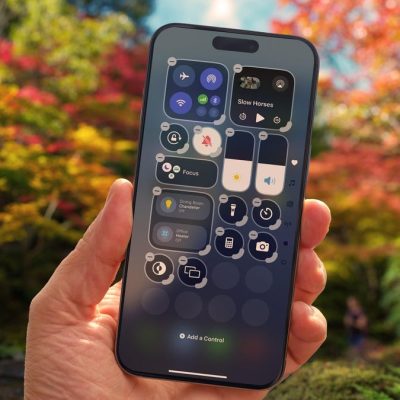
- For iPhone: Access Airplane mode from the Control Center. Depending on your model, swipe down or up and tap the icon, making sure to wait a few moments before turning it back off.
If toggling Airplane mode doesn’t improve your situation, consider restarting your device. This minor action can resolve many connectivity issues:
- For Android: Hold the power button until the menu appears, then select Restart.
- For iPhone: Hold down the sleep/wake button alongside one of the volume buttons, then slide to power off. After the phone has completely turned off, press the sleep/wake button again to restart.
Advanced Techniques for Persistent Signal Issues
If basic troubleshooting doesn’t suffice, there are additional steps you can take to boost cellphone signal. For one, try removing and reinserting your SIM card. Dirty SIM cards or poorly seated cards can disrupt connectivity. Here’s how:
- Using a SIM card tool or a paperclip, eject the SIM tray, inspect the card for any damage, and ensure it’s seated correctly.
- For devices with eSIMs, restarting your phone helps reset the connection.
Updating your device’s software and carrier settings can also enhance connectivity. Carrier updates are designed to fix bugs and improve your device’s performance:
- To update on iPhone: Go to Settings > General > About. If an update is available, you’ll see a prompt.
- To update on Android: Search for “carrier settings” within the settings app. Depending on your model, there may be an option for updates.
Contacting Your Carrier: When to Seek Help
Sometimes, issues may stem from problems with the cell tower itself, be it temporary outages or extensive maintenance. If you’ve tried everything and are still grappling with connectivity, contacting your carrier is advisable. They can provide insight into any known problems in your area or help troubleshoot your particular device.
Consider Investing in a Signal Booster
If, despite all efforts, you’re still struggling with poor reception, investing in a signal booster is an option worth exploring. Signal boosters work by amplifying the cellular signal your carrier uses:
- These devices can improve coverage for your entire home or a specific room.
- Prices range from around $349 for a single room to $999 for whole-home coverage. Be sure to check for return policies and warranties before purchasing.
In summary, having a reliable cellphone signal is crucial—especially in critical situations. By utilizing these strategies to boost cellphone signal, you can enhance your connection and maintain communication when it counts the most. For further resources on tech optimizations, check out our extensive guides and articles.
To deepen this topic, check our detailed analyses on Tech Tips & Tricks section.